5.6 스켈레톤 애니메이션
지금까지 우리는 모델-뷰 행렬을 업데이트하여 강체 객체를 애니메이션하는 방법을 배웠습니다. 이 튜토리얼에서는 동물이나 인간과 같은 캐릭터를 애니메이션하기 위한 스켈레톤 애니메이션을 만드는 방법을 살펴보겠습니다. 강체 객체와 달리 이러한 모델은 애니메이션 중에 변형됩니다.
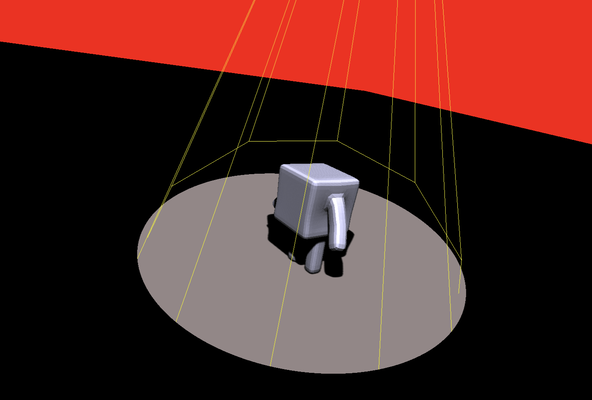
플레이그라운드 실행 - 5_06_skeleton_animation기본적으로 모든 애니메이션은 정점 위치를 직접 업데이트하여 달성할 수 있습니다. 그러나 이 접근 방식은 정점 데이터에 상당한 저장 공간을 요구하여 실시간 사용에는 비실용적입니다. 스켈레톤 애니메이션은 자연 시스템에서 영감을 받아 회전할 수 있는 조인트로 연결된 뼈대라고 불리는 강체 부분으로 구성된 단순화된 구조를 정의합니다. 3D 모델의 실제 정점은 이 뼈대에 연결됩니다.
뼈대는 계층적으로 구성되며, 척추가 뿌리이고, 사지가 가지이며, 손가락이 잔가지 역할을 합니다. 결과적으로, 뿌리 뼈대를 업데이트하면 연결된 모든 자식 뼈대에 영향을 미쳐 애니메이션을 직관적으로 만들 수 있습니다.
뼈대의 실제 회전과 이동을 결정하려면 뿌리부터 끝 뼈대까지 변환을 재귀적으로 적용해야 합니다.
각 뼈대는 영향 계수에 따라 정점에 영향을 미치며, 0 값은 영향을 미치지 않음을 의미합니다. 각 뼈대에 대한 변환이 결정되면, 해당 영향력에 비례하여 이러한 뼈대 변환을 적용하여 정점을 업데이트합니다.
이제 스켈레톤 애니메이션 구현에 대해 논의해 봅시다. 첫 번째 단계는 애니메이션된 에셋을 만드는 것입니다. 저는 이 목적을 위해 블렌더의 간단한 튜토리얼을 따랐습니다. 애니메이션이 완료되면 이를 파일로 내보내야 합니다. 모든 3D 파일 형식이 애니메이션을 지원하는 것은 아닙니다. 예를 들어, OBJ 파일 형식은 지원하지 않습니다. 이 예제에서는 DAE 파일 형식을 사용하겠습니다. 이전 튜토리얼과 마찬가지로, 우리의 초점은 파일 파서 구현에 있지 않습니다. 대신, 기존 형식 파서를 사용하여 필요한 데이터를 JavaScript에서 로드할 수 있도록 JSON으로 변환할 것입니다. 이번에는 DAE 파일 파서가 C++로 작성되어 있으므로 전처리는 C++에서 수행됩니다.
#include
#include
#include
#include
#include
#include

struct Bone
{
    aiBone *bone;
    aiNodeAnim *ani;
};

void printHierarchy(std::ofstream &outputFile, aiNode *node, int indentation,
                    std::unordered_map &bones, int &boneId, bool isRoot)
{
    std::cout << std::string(indentation, '-') << node->mName.C_Str() << std::endl;

    const std::string boneName = std::string(node->mName.C_Str());

    if (bones.find(boneName) != bones.end())
    {
        std::cout << "bone = = " << boneName << std::endl;
        outputFile << "{\"id\":" << (boneId++) << ",\"nodeTransform\":[" << std::endl;

        outputFile << node->mTransformation[0][0] << "," << node->mTransformation[0][1] << "," << node->mTransformation[0][2] << "," << node->mTransformation[0][3] << "," << node->mTransformation[1][0] << "," << node->mTransformation[1][1] << "," << node->mTransformation[1][2] << "," << node->mTransformation[1][3] << "," << node->mTransformation[2][0] << "," << node->mTransformation[2][1] << "," << node->mTransformation[2][2] << "," << node->mTransformation[2][3] << "," << node->mTransformation[3][0] << "," << node->mTransformation[3][1] << "," << node->mTransformation[3][2] << "," << node->mTransformation[3][3] << std::endl;

        outputFile << "],\"name\":\"" << node->mName.C_Str() << "\",\"children\":[" << std::endl;

        for (int i = 0; i < node->mNumChildren; ++i)
        {
            printHierarchy(outputFile, node->mChildren[i], indentation + 1, bones, boneId, false);

            if (i < node->mNumChildren - 1)
            {
                outputFile << "," << std::endl;
            }
        }

        outputFile << "]" << std::endl;

        aiBone *b = bones[boneName].bone;
        outputFile << ", \"offsetMatrix\":[";
        for (int i = 0; i < 4; ++i)
        {
            auto w = b->mOffsetMatrix[i];
            outputFile << w[0] << "," << w[1] << "," << w[2] << "," << w[3];
            if (i < 3)
            {
                outputFile << ",";
            }
        }
        outputFile << "],\n \"weights\":[" << std::endl;

        for (int i = 0; i < b->mNumWeights; ++i)
        {
            outputFile << "{\"id\":" << b->mWeights[i].mVertexId << ",\"w\":" << b->mWeights[i].mWeight << "}";
            if (i < b->mNumWeights - 1)
            {
                outputFile << "," << std::endl;
            }
        }
        outputFile << "]";

        aiNodeAnim *ani = bones[boneName].ani;

        if (ani)
        {

            outputFile << ",\"ani\":{" << std::endl;

            if (ani->mNumPositionKeys > 0)
            {
                outputFile << "\"pos\":[";

                for (int e = 0; e < ani->mNumPositionKeys; ++e)
                {
                    auto pk = ani->mPositionKeys[e];
                    outputFile << "{\"time\":" << pk.mTime << ",\"pos\":[" << pk.mValue[0] << "," << pk.mValue[1] << "," << pk.mValue[2] << "]}" << std::endl;
                    if (e < ani->mNumPositionKeys - 1)
                    {
                        outputFile << ",";
                    }
                }

                outputFile << "]" << std::endl;
            }

            if (ani->mNumRotationKeys > 0)
            {
                outputFile << ",\"rot\":[";

                for (int e = 0; e < ani->mNumRotationKeys; ++e)
                {
                    auto rk = ani->mRotationKeys[e];
                    outputFile << "{\"time\":" << rk.mTime << ",\"q\":[" << rk.mValue.w << "," << rk.mValue.x << "," << rk.mValue.y << "," << rk.mValue.z << "]}" << std::endl;
                    if (e < ani->mNumRotationKeys - 1)
                    {
                        outputFile << ",";
                    }
                }

                outputFile << "]" << std::endl;
            }

            if (ani->mNumScalingKeys > 0)
            {
                outputFile << ",\"scal\":[";

                for (int e = 0; e < ani->mNumScalingKeys; ++e)
                {
                    auto sk = ani->mScalingKeys[e];
                    outputFile << "{\"time\":" << sk.mTime << ",\"pos\":[" << sk.mValue[0] << "," << sk.mValue[1] << "," << sk.mValue[2] << "]}" << std::endl;
                    if (e < ani->mNumScalingKeys - 1)
                    {
                        outputFile << ",";
                    }
                }

                outputFile << "]" << std::endl;
            }

            outputFile << "}" << std::endl;
        }
        outputFile << "}";
    }
    else
    {
        if (isRoot)
        {
            outputFile << "{\"name\":\"" << node->mName.C_Str() << "\",\"nodeTransform\":[" << 1 << "," << 0 << "," << 0 << "," << 0 << "," << 0 << "," << 1 << "," << 0 << "," << 0 << "," << 0 << "," << 0 << "," << 1 << "," << 0 << "," << 0 << "," << 0 << "," << 0 << "," << 1 << std::endl;
        }
        else
        {
            outputFile << "{\"name\":\"" << node->mName.C_Str() << "\",\"nodeTransform\":[" << node->mTransformation[0][0] << "," << node->mTransformation[0][1] << "," << node->mTransformation[0][2] << "," << node->mTransformation[0][3] << "," << node->mTransformation[1][0] << "," << node->mTransformation[1][1] << "," << node->mTransformation[1][2] << "," << node->mTransformation[1][3] << "," << node->mTransformation[2][0] << "," << node->mTransformation[2][1] << "," << node->mTransformation[2][2] << "," << node->mTransformation[2][3] << "," << node->mTransformation[3][0] << "," << node->mTransformation[3][1] << "," << node->mTransformation[3][2] << "," << node->mTransformation[3][3] << std::endl;
        }
        outputFile << "],\"children\":[" << std::endl;
        for (int i = 0; i < node->mNumChildren; ++i)
        {
            printHierarchy(outputFile, node->mChildren[i], indentation + 1, bones, boneId, false);

            if (i < node->mNumChildren - 1)
            {
                outputFile << "," << std::endl;
            }
        }

        outputFile << "]}";
    }
}

int main()
{
    std::cout << "test" << std::endl;
    const char *path = "../../../data/cuberun.dae";
    Assimp::Importer importer;
    const aiScene *scene = importer.ReadFile(path, aiProcess_Triangulate | aiProcess_FlipUVs);
    if (!scene || scene->mFlags & AI_SCENE_FLAGS_INCOMPLETE || !scene->mRootNode)
    {
        std::cout << "ERROR::ASSIMP::" << importer.GetErrorString() << std::endl;
        return 1;
    }

    std::cout << "mesh count " << scene->mNumMeshes << std::endl;

    const aiMesh *mesh = scene->mMeshes[0];

    std::cout << "mesh uv channel " << mesh->GetNumUVChannels() << std::endl;

    // std::cout << "children count " << scene->mRootNode->mChildren[0]->mNumChildren << std::endl;

    std::ofstream outputFile;
    outputFile.open("cuberun.json");
    outputFile << "{\"vert\":[";

    for (unsigned int i = 0; i < mesh->mNumVertices; i++)
    {
        outputFile << mesh->mVertices[i][0] << ", " << mesh->mVertices[i][1] << ", " << mesh->mVertices[i][2] << ", ";
        outputFile << mesh->mNormals[i][0] << ", " << mesh->mNormals[i][1] << ", " << mesh->mNormals[i][2];
        if (i != mesh->mNumVertices - 1)
        {
            outputFile << ", " << std::endl;
        }
    }
    outputFile << "],\"indices\":[\n";

    for (unsigned int i = 0; i < mesh->mNumFaces; ++i)
    {
        aiFace face = mesh->mFaces[i];

        // std::cout << "face ";
        for (unsigned int f = 0; f < face.mNumIndices; ++f)
        {
            outputFile << face.mIndices[f];
            if (i != mesh->mNumFaces - 1 || f != face.mNumIndices - 1)
            {
                outputFile << ", ";
            }
        }
        outputFile << std::endl;
    }
    outputFile << "],\"skeleton\":[\n";

    std::unordered_map bones;

    if (mesh->HasBones())
    {
        for (int i = 0; i < mesh->mNumBones; ++i)
        {
            bones[std::string(mesh->mBones[i]->mName.C_Str())] = {mesh->mBones[i], nullptr};
            // std::cout << "insert bone " << mesh->mBones[i]->mName.C_Str() << std::endl;
        }
        std::cout << "animation size " << scene->mNumAnimations << std::endl;

        aiAnimation *ani = scene->mAnimations[0];

        std::cout << "channel size" << ani->mNumChannels << std::endl;

        for (int i = 0; i < ani->mNumChannels; ++i)
        {
            aiNodeAnim *a = ani->mChannels[i];
            std::string boneName = std::string(a->mNodeName.C_Str());
            if (bones.find(boneName) != bones.end())
            {
                bones[boneName].ani = a;
            }
        }
    }
    int boneId = 0;
    printHierarchy(outputFile, scene->mRootNode, 0, bones, boneId, true);

    outputFile << "]}";

    outputFile.close();

    /*
        std::cout << "has tex " << mesh->HasTextureCoords(0) << std::endl;

        std::cout << "has bone " << mesh->HasBones() << std::endl;

        std::cout << "bones " << mesh->mNumBones << std::endl;
*/

    return 0;
}
DAE 파일을 파싱하는 데 사용하는 라이브러리는 Assimp라고 불립니다. 이 다재다능한 도구는 다양한 일반적인 3D 형식을 처리할 수 있습니다. Assimp는 3D 객체를 장면 구조로 구성합니다. 단일 메시를 포함하는 데모 파일의 경우, 우리는 메시 0을 검색합니다. 그런 다음 OBJ 파일에 사용된 프로세스와 유사하게 정점, 정점 노멀 및 삼각형 메시를 포함하는 지오메트리 데이터를 추출해야 합니다.
우리의 주요 초점은 뼈대와 애니메이션을 추출하는 것입니다. 장면 구조는 고유한 이름을 가진 뼈대 목록과 애니메이션 목록을 포함합니다. 애니메이션이 하나만 있으므로 애니메이션 객체도 하나뿐입니다. 이 애니메이션 객체에는 여러 채널이 있으며, 각 채널은 뼈대와 연결됩니다. 채널은 연결된 뼈대에 해당하는 노드 이름을 포함합니다. 이 정보를 사용하여 뼈대를 해당 애니메이션에 매핑할 수 있습니다.
장면 구조는 컴퓨터 그래픽에서 일반적인 접근 방식인 객체를 계층적으로 구성합니다. 예를 들어, 자동차의 3D 모델에서 바퀴는 차체의 자식입니다. 여러 자동차 모델이 있는 장면에서는 장면 자체가 루트 노드이며, 각 자동차는 자식 노드입니다. 바퀴 및 문과 같은 부품 및 액세서리는 자동차 노드의 자식입니다. 이러한 계층 구조를 통해 부모 노드에 적용된 변환이 모든 자식에게 자동으로 영향을 미칠 수 있습니다. 예를 들어, 자동차를 움직이면 바퀴와 문도 함께 움직입니다. 따라서 리프 노드의 변환을 계산할 때는 장면 루트에서 누적된 모든 변환을 고려해야 합니다.
데모 장면에서는 객체가 하나뿐이지만, 뼈대도 계층적으로 구성되어 있습니다. 결과적으로 어깨를 움직이면 팔뚝과 손가락에 영향을 미칩니다.
데이터 추출의 두 번째 부분에서는 이 계층적 구조를 덤프해야 합니다. 우리는 장면 루트부터 시작합니다. 장면 루트는 그 자체로 3D 객체는 아니지만 장면을 나타냅니다. 장면 루트는 변환이 없으므로 항등 행렬을 할당합니다. 나머지 노드에 대해서는 노드가 뼈대인지 3D 메시의 일부인지 결정합니다. 메시인 경우 변환을 저장합니다. 뼈대인 경우 오프셋 행렬, 가중치 및 애니메이션을 저장합니다.
오프셋 행렬은 뼈대에 고유하며 추가 위치 정보를 제공합니다. 가중치는 각 정점에 대한 튜플이며, 첫 번째 요소는 정점 ID이고 두 번째 요소는 영향 계수입니다.
애니메이션의 경우, 우리는 변환 시퀀스를 추출합니다. 시퀀스 길이는 키프레임 수에 해당하며, 각 키프레임에는 타임스탬프와 세 가지 유형의 변환(이동, 회전, 스케일)이 있습니다. 이동 및 스케일은 벡터로 표현되는 반면, 회전은 쿼터니언으로 표현됩니다.
let boneWeights = new Float32Array(this.objBody.vert.length * 16 / 3);

function assignBoneWeightsToVerticesHelper(bone) {

    if (bone.weights) {
        for (let i = 0; i < bone.weights.length; ++i) {
            const { id, w } = bone.weights[i];
            boneWeights[id * 16 + bone.id] = w;
        }
    }

    if (bone.children) {
        if (bone.children.length > 0) {
            for (let i = 0; i < bone.children.length; ++i) {
                assignBoneWeightsToVerticesHelper(bone.children[i]);
            }
        }
    }
}

for (let i = 0; i < this.objBody.skeleton.length; ++i) {
    assignBoneWeightsToVerticesHelper(this.objBody.skeleton[i]);
}
파일 처리의 첫 번째 단계는 평면화된 정점 뼈대 가중치 배열을 만드는 것입니다. 루트 장면을 포함하여 16개의 뼈대가 있으므로 각 정점은 16개의 float 값과 연결됩니다. 실제로는 13개의 뼈대가 있지만, 정렬상의 이유로 가장 가까운 4의 배수인 16으로 반올림합니다. 이는 나중에 설명될 것입니다. 뼈대는 계층적 트리 구조로 구성되어 있으므로 도우미 함수를 사용하여 모든 뼈대 노드를 재귀적으로 방문합니다.
updateAnimation(time) {
    let boneTransforms = new Float32Array(16 * 16);

    function interpolatedV(time, V, interpolate) {

        time = time % V[V.length - 1].time;
        /*  while (time > V[V.length - 1].time) {
              time -= V[V.length - 1].time;
          }*/

        let firstIndex = -1;

        for (; firstIndex < V.length - 1; ++firstIndex) {
           // const i = (firstIndex + V.length) % V.length;
           // console.log(i,firstIndex)
            if (time < V[firstIndex + 1].time) {
                break;
            }
        }

        const secondIndex = firstIndex + 1;

        let startTime = 0;
        let endTime = V[secondIndex].time;

        if (firstIndex == -1) {
            firstIndex = V.length - 1;
        }
        else {
            startTime = V[firstIndex].time;
        }

        const factor = (time - startTime) / (endTime - startTime);

        return interpolate(V[firstIndex], V[secondIndex], factor);
    }


    function deriveBoneTransformHelper(bone, parentTransform) {
        if (bone.id !== undefined) {
            const offsetMatrix = glMatrix.mat4.fromValues(
                bone.offsetMatrix[0],
                bone.offsetMatrix[4],
                bone.offsetMatrix[8],
                bone.offsetMatrix[12],
                bone.offsetMatrix[1],
                bone.offsetMatrix[5],
                bone.offsetMatrix[9],
                bone.offsetMatrix[13],
                bone.offsetMatrix[2],
                bone.offsetMatrix[6],
                bone.offsetMatrix[10],
                bone.offsetMatrix[14],
                bone.offsetMatrix[3],
                bone.offsetMatrix[7],
                bone.offsetMatrix[11],
                bone.offsetMatrix[15]);
            if (bone.ani) {

                const interpolatedPos = interpolatedV(time, bone.ani.pos, (pos1, pos2, factor) => {
                    return glMatrix.vec3.lerp(glMatrix.vec3.create(), glMatrix.vec3.fromValues(pos1.pos[0], pos1.pos[1], pos1.pos[2]),
                        glMatrix.vec3.fromValues(pos2.pos[0], pos2.pos[1], pos2.pos[2]), factor);
                });
                const translationMatrix = glMatrix.mat4.fromTranslation(glMatrix.mat4.create(),
                    interpolatedPos);

                const interpolatedQuat = interpolatedV(time, bone.ani.rot, (quat1, quat2, factor) => {
                    return glMatrix.quat.lerp(glMatrix.quat.create(),
                        glMatrix.quat.fromValues(quat1.q[1], quat1.q[2], quat1.q[3], quat1.q[0]),
                        glMatrix.quat.fromValues(quat2.q[1], quat2.q[2], quat2.q[3], quat2.q[0]),
                        factor
                    );
                });

                const rotationMatrix = glMatrix.mat4.fromQuat(glMatrix.mat4.create(), interpolatedQuat);

                const interpolatedScale = interpolatedV(time, bone.ani.scal, (scal1, scal2, factor) => {
                    return glMatrix.vec3.lerp(glMatrix.vec3.create(), glMatrix.vec3.fromValues(scal1.pos[0], scal1.pos[1], scal1.pos[2]),
                        glMatrix.vec3.fromValues(scal2.pos[0], scal2.pos[1], scal2.pos[2]), factor);
                });

                const scalingMatrix = glMatrix.mat4.fromScaling(glMatrix.mat4.create(), interpolatedScale);

                const rotation_x_scale = glMatrix.mat4.multiply(glMatrix.mat4.create(),
                    rotationMatrix, scalingMatrix);

                const locationTransformation = glMatrix.mat4.multiply(glMatrix.mat4.create(),
                    translationMatrix, rotation_x_scale);

                const globalTransformation = glMatrix.mat4.multiply(glMatrix.mat4.create(),
                    parentTransform, locationTransformation);

                const finalBoneTransformation = glMatrix.mat4.multiply(glMatrix.mat4.create(),
                    globalTransformation, offsetMatrix);

                boneTransforms.set(finalBoneTransformation, bone.id * 16);
                /*
                                        console.log("bone transform ", bone.name, finalBoneTransformation);
                                        console.log("node trans", locationTransformation);
                                        console.log("parent", parentTransform);*/

                if (bone.children.length > 0) {
                    for (let i = 0; i < bone.children.length; ++i) {
                        deriveBoneTransformHelper(bone.children[i], globalTransformation);
                    }
                }
            }
            else {
                const nodeTransform = glMatrix.mat4.fromValues(bone.nodeTransform[0],
                    bone.nodeTransform[4],
                    bone.nodeTransform[8],
                    bone.nodeTransform[12],
                    bone.nodeTransform[1],
                    bone.nodeTransform[5],
                    bone.nodeTransform[9],
                    bone.nodeTransform[13],
                    bone.nodeTransform[2],
                    bone.nodeTransform[6],
                    bone.nodeTransform[10],
                    bone.nodeTransform[14],
                    bone.nodeTransform[3],
                    bone.nodeTransform[7],
                    bone.nodeTransform[11],
                    bone.nodeTransform[15]);

                const bt = glMatrix.mat4.multiply(glMatrix.mat4.create(), parentTransform, nodeTransform);
                const bt2 = glMatrix.mat4.multiply(glMatrix.mat4.create(), bt, offsetMatrix);
                boneTransforms.set(bt2, bone.id * 16);
                /* console.log("= bone transform ", bone.name, bt2);
                 console.log("= bone nodeTransform", nodeTransform);
                 console.log("global ", bt);*/

                if (bone.children.length > 0) {
                    for (let i = 0; i < bone.children.length; ++i) {
                        deriveBoneTransformHelper(bone.children[i], bt);
                    }
                }
            }
        }

        else {

            const nodeTransform = glMatrix.mat4.fromValues(bone.nodeTransform[0],
                bone.nodeTransform[4],
                bone.nodeTransform[8],
                bone.nodeTransform[12],
                bone.nodeTransform[1],
                bone.nodeTransform[5],
                bone.nodeTransform[9],
                bone.nodeTransform[13],
                bone.nodeTransform[2],
                bone.nodeTransform[6],
                bone.nodeTransform[10],
                bone.nodeTransform[14],
                bone.nodeTransform[3],
                bone.nodeTransform[7],
                bone.nodeTransform[11],
                bone.nodeTransform[15]);

            const globalTransformation = glMatrix.mat4.multiply(glMatrix.mat4.create(),
                parentTransform, nodeTransform);

            // console.log("* bone transform ", bone.name, globalTransformation);

            if (bone.children.length > 0) {
                for (let i = 0; i < bone.children.length; ++i) {
                    deriveBoneTransformHelper(bone.children[i], globalTransformation);
                }
            }
        }
    }

    for (let i = 0; i < this.objBody.skeleton.length; ++i) {
        deriveBoneTransformHelper(this.objBody.skeleton[i], glMatrix.mat4.identity(glMatrix.mat4.create()));
    }

    //console.log("bone transformation", boneTransforms);
    return boneTransforms;

}
다음으로, 특정 타임스탬프가 주어졌을 때 현재 뼈대 변환을 반환하도록 설계된 도우미 함수를 살펴보겠습니다. 이 함수는 각 뼈대에 필요한 모든 변환(로컬 이동, 회전, 스케일뿐만 아니라 부모로부터 누적된 변환 및 오프셋 행렬 포함)을 검색합니다. 요청된 타임스탬프가 키프레임에 해당하지 않을 수 있으므로, 적절한 변환을 계산하기 위해 보간이 수행됩니다. 그런 다음 함수는 모든 자식 뼈대를 재귀적으로 처리합니다. 그 결과는 모든 뼈대에 대한 평면화된 변환 배열이며, 이는 셰이더로 유니폼으로 전달됩니다.
@group(0) @binding(0)
var modelView: mat4x4;
@group(0) @binding(1)
var projection: mat4x4;
@group(0) @binding(2)
var normalMatrix: mat4x4;
@group(0) @binding(3)
var lightDirection: vec3;
@group(0) @binding(4)
var viewDirection: vec3;

@group(0) @binding(5)
var ambientColor:vec4;// = vec4(0.15, 0.10, 0.10, 1.0);
@group(0) @binding(6)
var diffuseColor:vec4;// = vec4(0.55, 0.55, 0.55, 1.0);
@group(0) @binding(7)
var specularColor:vec4;// = vec4(1.0, 1.0, 1.0, 1.0);

@group(0) @binding(8)
var shininess:f32;// = 20.0;

@group(1) @binding(0)
var boneTransforms: array, 16>;

const diffuseConstant:f32 = 1.0;
const specularConstant:f32 = 1.0;
const ambientConstant: f32 = 1.0;

fn specular(lightDir:vec3, viewDir:vec3, normal:vec3,  specularColor:vec3,
     shininess:f32) -> vec3 {
    let reflectDir:vec3 = reflect(-lightDir, normal);
    let specDot:f32 = max(dot(reflectDir, viewDir), 0.0);
    return pow(specDot, shininess) * specularColor;
}

fn diffuse(lightDir:vec3, normal:vec3,  diffuseColor:vec3) -> vec3{
    return max(dot(lightDir, normal), 0.0) * diffuseColor;
}

struct VertexOutput {
    @builtin(position) clip_position: vec4,
    @location(0) viewDir: vec3,
    @location(1) normal: vec3,
    @location(2) lightDir: vec3,
    @location(3) wldLoc: vec3,
    @location(4) lightLoc: vec3,
    @location(5) inPos: vec3
};

@vertex
fn vs_main(
    @location(0) inPos: vec3,
    @location(1) inNormal: vec3,
    @location(2) boneWeight0: vec4,
    @location(3) boneWeight1: vec4,
    @location(4) boneWeight2: vec4,
    @location(5) boneWeight3: vec4
) -> VertexOutput {
    var out: VertexOutput;
    var totalTransform:mat4x4 = mat4x4(0.0,0.0,0.0,0.0,
        0.0,0.0,0.0,0.0,
        0.0,0.0,0.0,0.0,
        0.0,0.0,0.0,0.0);

        totalTransform += boneTransforms[0]  * boneWeight0[0];
        totalTransform += boneTransforms[1] * boneWeight0[1];
        totalTransform += boneTransforms[2]* boneWeight0[2];
        totalTransform += boneTransforms[3] * boneWeight0[3];
        totalTransform += boneTransforms[4] * boneWeight1[0];
        totalTransform += boneTransforms[5] * boneWeight1[1];
        totalTransform += boneTransforms[6] * boneWeight1[2];
        totalTransform += boneTransforms[7] * boneWeight1[3];
        totalTransform += boneTransforms[8] * boneWeight2[0];
        totalTransform += boneTransforms[9] * boneWeight2[1];
        totalTransform += boneTransforms[10]* boneWeight2[2];
        totalTransform += boneTransforms[11] * boneWeight2[3];
        totalTransform += boneTransforms[12] * boneWeight3[0];


    out.viewDir = normalize((normalMatrix * vec4(-viewDirection, 0.0)).xyz);
    out.lightDir = normalize((normalMatrix * vec4(-lightDirection, 0.0)).xyz);
    out.normal = normalize(normalMatrix * totalTransform * vec4(inNormal, 0.0)).xyz;
    var wldLoc:vec4 = modelView *totalTransform *vec4(inPos,1.0);
    out.clip_position = projection * wldLoc;
    out.wldLoc = wldLoc.xyz / wldLoc.w;
    out.inPos = (totalTransform *vec4(inPos,1.0)).xyz;
    var lightLoc:vec4 = modelView * vec4(lightDirection, 1.0);
    out.lightLoc = lightLoc.xyz / lightLoc.w;

    return out;
}
여기서 사용된 셰이더는 섀도우 맵 셰이더를 각색한 것으로, 주로 정점 셰이더에 수정이 이루어졌습니다. 두 가지 추가 정보가 전달됩니다: 현재 애니메이션 프레임의 뼈대 변환을 포함하는 유니폼으로서의 뼈대 변환, 그리고 정점 속성으로서의 뼈대 가중치입니다. 정점 속성은 행렬과 같은 큰 데이터를 직접 처리할 수 없으므로, 가중치를 각각 4개의 float 값을 포함하는 4개의 벡터로 분해합니다. 이로 인해 정렬을 위해 뼈대 개수를 16개로 반올림해야 합니다.
정점 셰이더에서는 뼈대 가중치를 기반으로 뼈대 변환의 가중 합을 계산합니다. 이 계산된 변환은 이전에 사용된 모델-뷰 행렬 및 투영 행렬에 이어 정점에 적용됩니다.
뼈대 변환 유니폼에 전용 그룹 ID를 할당하는 것이 중요합니다. 뼈대 변환은 자주 업데이트되므로, 다른 안정적인 유니폼과 분리하면 성능 최적화에 도움이 됩니다.
this.boneWeightBuffer = createGPUBuffer(device, boneWeights, GPUBufferUsage.VERTEX);
const boneWeight0AttribDesc = {
    shaderLocation: 2,
    offset: 0,
    format: 'float32x4'
};

const boneWeight1AttribDesc = {
    shaderLocation: 3,
    offset: 4 * 4,
    format: 'float32x4'
};

const boneWeight2AttribDesc = {
    shaderLocation: 4,
    offset: 4 * 8,
    format: 'float32x4'
};

const boneWeight3AttribDesc = {
    shaderLocation: 5,
    offset: 4 * 12,
    format: 'float32x4'
};

const boneWeightBufferLayoutDesc = {
    attributes: [boneWeight0AttribDesc, boneWeight1AttribDesc, boneWeight2AttribDesc, boneWeight3AttribDesc],
    arrayStride: 4 * 16,
    stepMode: 'vertex'
};
const pipelineDesc = {
    layout,
    vertex: {
        module: shaderModule,
        entryPoint: 'vs_main',
        buffers: [positionBufferLayoutDesc,
            normalBufferLayoutDesc,
            boneWeightBufferLayoutDesc]
    },
    fragment: {
        module: shaderModule,
        entryPoint: 'fs_main',
        targets: [colorState]
    },
    primitive: {
        topology: 'triangle-list',
        frontFace: 'ccw',
        cullMode: 'none'
    },
    depthStencil: {
        depthWriteEnabled: true,
        depthCompare: 'less',
        format: 'depth32float'
    }
};
다음으로 뼈대 가중치 버퍼를 설정하는 방법을 살펴보겠습니다. 이미 평면화된 뼈대 가중치 배열을 생성했으며, 이제 이 배열을 사용하여 뼈대 가중치를 저장하는 네 개의 정점 속성을 채웁니다.
if (!startTime) {
    startTime = timestamp;
}
const elapsed = timestamp - startTime;
const boneTransforms = runCube.updateAnimation(elapsed);
let boneTransformBufferUpdate = createGPUBuffer(device, boneTransforms, GPUBufferUsage.COPY_SRC);
commandEncoder.copyBufferToBuffer(boneTransformBufferUpdate, 0,
    runCube.boneTransformUniformBuffer, 0, boneTransforms.byteLength);
마지막으로, 애니메이션 변환이 어떻게 업데이트되는지 살펴보겠습니다. 각 프레임마다 경과 시간을 측정하고, 이를 사용하여 현재 뼈대 변환을 계산한 다음, 이 변환들을 유니폼 버퍼에 로드합니다. 이렇게 하면 장면이 진행됨에 따라 애니메이션이 유연하고 최신 상태를 유지할 수 있습니다.